- Home
- Twitter header size
Twitter header size: 1500×500, and what to keep clear
The Twitter header size is 1500×500 pixels, a 3:1 shape, as X’s help centre recommends. Your profile photo sits over the bottom-left corner, so keep anything important out of the area from about 0 to 420 pixels across and 320 to 500 pixels down.
What we measured
On 31 October 2026 we opened a public profile on x.com in a browser at two widths and measured the header and the profile photo on the page. Then we converted those sizes to the pixels of a 1500×500 image.
Phone width, 390 pixels: the header showed at 390×130, a full 3:1 with nothing cropped. The profile photo covered about 62 to 406 pixels across, from 328 pixels down.
Desktop width, 1280 pixels: the header showed at 600×200, again a full 3:1. The profile photo covered about 40 to 380 pixels across, from 330 pixels down.
What this doesn't cover: we tested the website, one profile and two widths. We didn't test the iPhone or Android apps, and X can change its layout at any time, so check your own header after you upload it.
A simple rule for safe zones
Keep the photo corner clear. Leave 0 to 420 across and 320 to 500 down empty of words and faces. That covers both measurements above, with a little room to spare.
Put the main thing in the middle band. About 100 to 400 pixels down is our rule of thumb, not an X rule. On the web the whole header showed, but we couldn't test the apps, and the middle band is the safe choice if an app trims the edges.
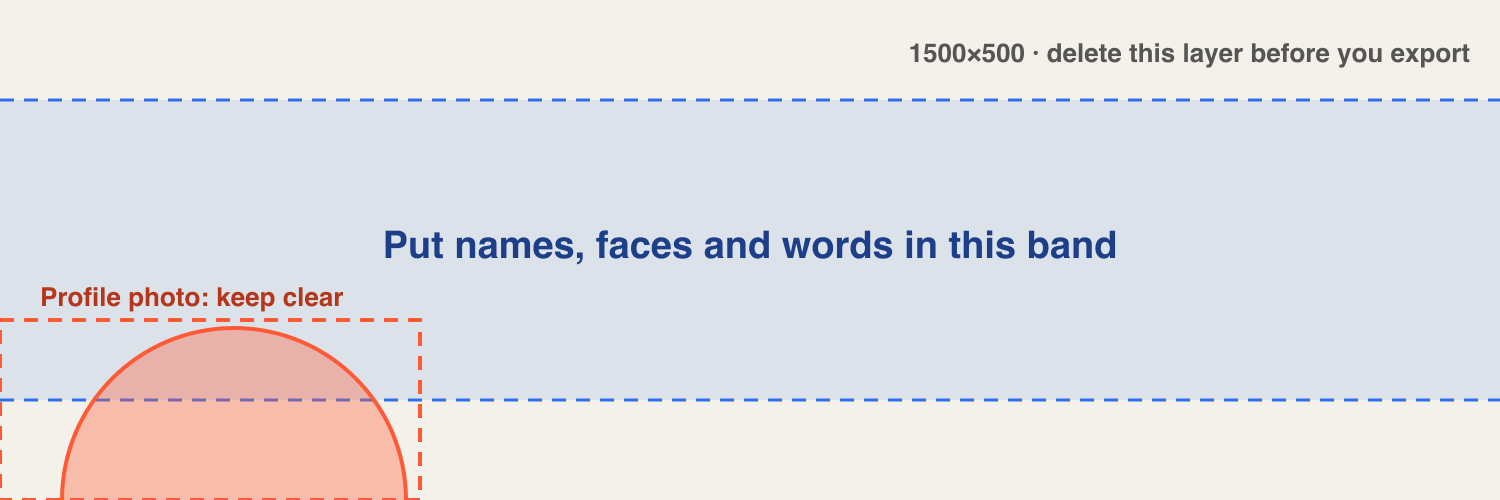
You can download this guide and blank files from the Twitter banner template page.
Exporting a sharp header
Export at exactly 1500×500, so X doesn't have to resize a different shape. At phone width your header shows far smaller than that, so small words that look fine on a big screen can become unreadable. Before you upload, shrink your design to about 390 pixels wide and check that you can still read it.
If you'd rather not measure anything, the free Twitter header maker already leaves the photo corner clear, and so do the paid header designs.
Questions
What is the Twitter header size?
1500×500 pixels, a 3:1 shape. It's the same as the X header size, because Twitter is now X.
Is the Twitter banner size different on a phone?
The image you upload is the same. In our test on the x.com website, it showed smaller on a phone but kept the same 3:1 shape, with nothing cropped. We didn't test the phone apps.
Where does the profile photo cover the header?
The bottom-left corner. In our test it covered roughly 40 to 406 pixels across, from about 328 pixels down, in a 1500×500 image. Keeping 0 to 420 across and 320 to 500 down clear covers that.
How do I change my header?
On X, open your profile, choose Edit profile, select the header image and upload your file. You can move and zoom it there before you save.
Make yours from your X
Card pack $9 once, or Monthly $4 a month. Both include all 536 designs.