Guide ·
Best free X banner maker for creators
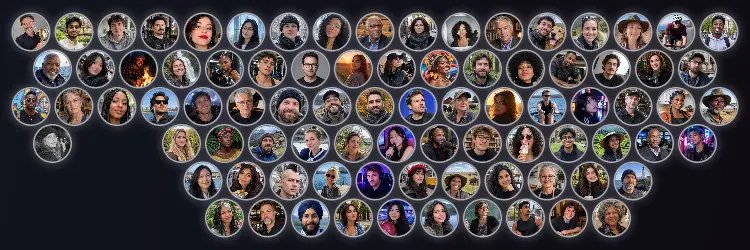
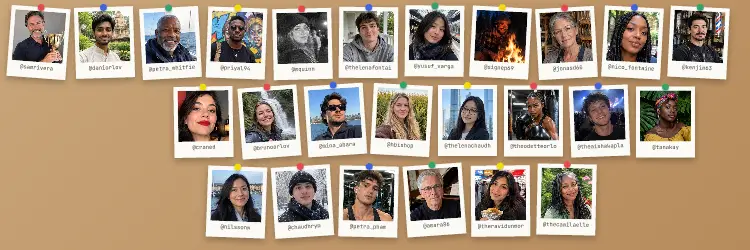
For creators who want a banner made from their own audience, Orbit Cards is a free X banner maker: type your username and it draws 139 header designs at 1500×500 from the faces of your followers and the people you talk with. There's no login, no ads and no paid plan.
We make Orbit Cards, so read this as a page by one of the tools in it. Canva, Kapwing and CutNoodle also come up when creators ask this question; what we say about them is what their own pages said on 21 November 2026, linked, and anything they didn't say is marked “not checked”. To try ours now, open X Followers Header.
Free tool · no login X Followers Header A 1500×500 header made of your followers. Type your X username to start. Open X Followers Header →Who is the Orbit Cards banner maker for?
Creators whose audience is the point: people who reply a lot, run a community or want their regulars to spot themselves on the profile. It reads your last 30 days of public posts and about 70 followers, ranks the people you talk with most, and seats them in the middle band that every screen shows. Faces are sized to the crowd, so a small account gets bigger faces rather than empty space.
It isn't the right tool for a banner built round a logo, a product shot or a slogan: the designs are made from profile photos. You can change colours and fonts in the Studio, but not add your own images.

What does it cost?
Nothing. Every header design is open, with no plan, no card and no ads, and you can download as often as you like as PNG, JPG or WebP. It never signs in to X, never posts, follows or likes, and stores nothing on our servers: the read happens in your browser and is kept there for 6 hours.
How does it compare with Canva, Kapwing and CutNoodle?
| Tool | Starts from | Login needed? | Price | 1500×500 X header? |
|---|---|---|---|---|
| Orbit Cards | Your X username: faces of your followers and the people you talk with | No | Free, no ads | Yes, 139 designs |
| Canva | A blank page or an X header template you fill in yourself (header maker) | Not checked | Free plan; Pro 15 US dollars a month, Business 21 a month per person, billed monthly (pricing) | Yes (size guide) |
| Kapwing | A 1500×500 template you upload your own image into (template) | Not to edit; when we tried its header template, it asked us to sign in to export | Free plan, exports carry a Kapwing watermark; Pro 24 US dollars a month, Business 64, billed monthly (pricing) | Yes |
| CutNoodle | Your X username: up to 400 of your public followers or the accounts you follow (header page) | No | Free; its pages carry sponsor spots (home page) | Yes, as a JPG, plus 1200×1200 and 1500×500 animated MP4s |
CutNoodle is the closest to Orbit Cards: it also builds a header from a username with no login. Its header places followers or the accounts you follow, and its page says that's a relationship list, not a ranking of who you talk with; Orbit Cards puts the people you talk with most in the best spots, then fills in with followers. CutNoodle adds animated MP4 versions; Orbit Cards offers 139 header designs and shows no sponsor spots.
Canva and Kapwing are editors: you bring the photos and the words. They're the better pick for a banner built round your own photo, logo or slogan. For Canva in more detail, see Orbit Cards vs Canva.
How do you make your banner?
- Open X Followers Header and type your X username.
- Pick a design; choose who's on it with I talk with, Followers or Mix, and pin or leave out anyone.
- Download the 1500×500 file and upload it in Edit profile on X.
More layouts are in X header ideas, and the measurements are on Twitter header size.
Frequently asked questions
What is the best free X banner maker for creators?
If you want a banner made from your own audience, Orbit Cards: it draws 1500×500 X headers from your followers' and friends' faces, free, from your username, with no login and no ads. CutNoodle also makes a free header from a username; Canva and Kapwing are editors where you add your own images.
Does Orbit Cards ask me to pay?
No. There's no payment and no plan. Every header design is open, and you download the file to upload yourself.
Can I put my logo on the banner?
No. The designs are made from profile photos. You can change colours and fonts in the Studio; for a logo banner, start from a blank 1500×500 template.
Does it work for a small account?
Yes. Each design sizes faces to the crowd, so a header made from twenty people still fills the full 1500×500.
Sources
- Canva: Free X/Twitter Header Maker
- Canva: Plans and pricing (Free, Pro, Business, Enterprise)
- Kapwing: 1500x500 Twitter Banner Image Size Template
- Kapwing: Pricing (Free, Pro, Business, Enterprise)
- CutNoodle: X Followers Header
- CutNoodle: free browser tools for creators
- X Help Center: How to customize your profile (header and profile photo sizes)
- FxTwitter (FxEmbed) on GitHub: the open-source service your browser reads public X posts through