Guide ·
Orbit Cards vs Canva: X headers and media kits compared
Orbit Cards is free with no login: type your X username and it makes a 1500×500 header from your followers' faces, or a media kit with your real follower stats. Canva is a design editor with a free plan, where you build the image yourself from a template or a blank page.
We make Orbit Cards, so read this as a comparison by one side. Everything about Orbit Cards comes from how it works today; everything about Canva is what Canva's own public pages said on 21 November 2026, with the page linked. Where Canva's pages don't say, we've written “Not checked”. If something is wrong, write to hello@orbitcards.app and we'll fix it. Orbit Cards isn't connected to Canva.
Free tool · no login X Followers Header A 1500×500 header made of your followers. Type your X username to start. Open X Followers Header →How do Orbit Cards and Canva compare?
| Orbit Cards | Canva | |
|---|---|---|
| Price | Free, every design | Free plan at no cost; Pro 15 US dollars a month for one person, Business 21 US dollars a month per person, billed monthly (pricing page) |
| Login | None: type an X username | Not checked |
| Ads | None | Not checked |
| Where you start | Your X username: your profile, followers and the people you talk with | A blank page or one of its X header templates (X header maker page) |
| 1500×500 X header | Yes, every header design | Yes: its size guide gives 1,500 × 500 px (X sizes page) |
| Profile photo corner kept clear | Always | You leave the space: its header page advises leaving room at the bottom left for your profile photo (X header maker page) |
| Your followers' faces in it | Yes: the people you talk with most first, then followers; pin or drop anyone | Not mentioned on its X header page |
| Media kit with your X stats | Yes, filled in from your last 30 days of public posts | Media kit templates you edit yourself; its page doesn't mention pulling in X stats (media kit page) |
| Editing | 859 designs; edit or hide any line of text, fonts, text size, colours and frame | A drag-and-drop editor: change images, fonts and colours, and upload your own images (X header maker page) |
| Downloads | PNG, JPG, WebP, MP4; square, portrait, story, 1500×500 header | PDF, JPG and PNG on every plan, Free included (pricing page) |
| Other platforms | X only, though X Post to Image turns an X post into an image for Instagram, LinkedIn and stories | Many: its layouts come pre-sized for each network, such as Facebook, X and Pinterest (X header maker page) |
What's the best free X banner maker for creators?
It depends on what you want the banner to say. If you want it to show your people, X Followers Header makes a 1500×500 banner from the faces of your followers and the people you talk with most. It's free, needs no login, keeps the profile photo corner clear, and you can pin or drop anyone before you download.
If you want to design every part yourself, with your own photo, logo or slogan, a design editor such as Canva suits that better. Its X header maker starts from a blank page or a template, and its free plan exports PNG and JPG at custom sizes, by its pricing page. Start from a blank 1500×500 file and the photo-corner guide on the Twitter banner template page, which any editor that opens a PNG can use.


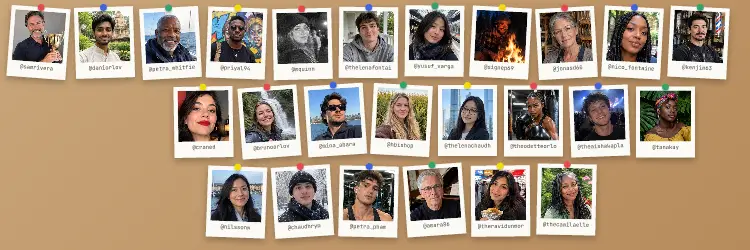
What's the easiest way to make a 1500×500 Twitter header?
1. Type your X username into X Followers Header. Your browser reads your public profile and the people you talk with; there's nothing to sign in to.
2. Pick a header. Every design is already 1500×500, the size X recommends, with the profile photo corner left clear. The Studio previews it on desktop and phone.
3. Download and upload. Download the PNG, open X, tap Edit profile, tap the header and pick the file. Orbit Cards never changes your profile for you.
Making it in an editor instead? Start a 1500×500 canvas and keep words and faces out of the bottom-left corner; the measurements are on the Twitter header size page. In Canva, its X header maker says to search for the “X (Twitter) Header” design type, then start blank or from a template.
Is there a free media kit generator for X creators with your follower stats?
Yes. X Media Kit Generator puts the numbers a brand asks for on one image: your followers, average views per post, engagement rate, posts per week and your top post of the last 30 days, with your name, photo and bio. Type your username and the numbers come from your public posts as X shows them; nothing is rounded up or estimated. It's free and needs no login.
Canva's media kit maker is a set of templates you edit yourself, so you'd type your numbers in. Its page doesn't mention reading stats from X.
When is Canva the better pick?
When you want to design from a blank page, or need images for other networks too: Canva's layouts come pre-sized for Facebook, X, Pinterest and more. Its pricing page also lists Brand Kits, one on the free plan, and premium templates, AI tools and a background remover on its paid plans. If you want a banner with no faces in it, built around your own brand, a full design editor is the better fit. Orbit Cards is made for images drawn from your X account.
When is Orbit Cards the better pick?
When you want the image to come from your X account, not from a blank page: your people on a header, your real stats on a media kit, your month in X Recap, or a ring round your photo with X Profile Ring. And when you'd rather not make an account at all. It never signs in to X, never posts, follows or likes, and stores nothing on our servers: the read happens in your browser and is kept there for 6 hours.
Orbit Cards reads public posts only, so a private (protected) account can't be read.
Frequently asked questions
Is Orbit Cards free?
Orbit Cards is free with no plan, no card and no ads: every design opens from an X username. Canva also has a free plan; its paid plans add premium templates and tools, according to its pricing page as of 21 November 2026.
Do I need an account to make an X header?
Not with Orbit Cards: you type a username and never sign in. We didn't find Canva's own pages saying whether you need a Canva account, so we haven't checked that.
Can I edit an Orbit Cards header in Canva?
Yes. Download it as a PNG and open it in Canva or any editor that opens a PNG. In the Orbit Cards Studio you can already edit or hide its text and change fonts and colours.
Is Orbit Cards connected to Canva?
No. They're separate products by different people. We compare them because people ask which to use for an X header or media kit.
When was this comparison checked?
On 21 November 2026, from Canva's own public pages: pricing, the X header maker, the X sizes guide and the media kit maker. Write to hello@orbitcards.app if something has changed.
Sources
- Canva: Plans and pricing (Free, Pro, Business, Enterprise)
- Canva: Free X/Twitter Header Maker
- Canva's Design Wiki: X/Twitter sizes
- Canva: Free Media Kit Maker
- X Help Center: How to customize your profile (header and profile photo sizes)
- FxTwitter (FxEmbed) on GitHub: the open-source service your browser reads public X posts through