Guide ·
How do I create a photo mosaic of my X mutuals?
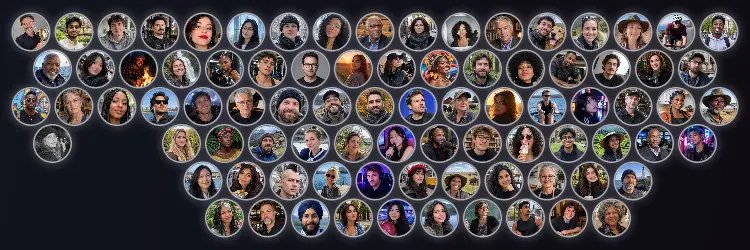
Type your username into X Followers Header, a free Orbit Cards tool, choose “I talk with” and open the Mosaic design: it lays out the people you talk with most at 1500×500, your ten closest in big tiles. For a square wall of your followers instead, use the X Mosaic Generator; neither needs a login.
Both are made from one read of your public posts, in your browser. Start with X Followers Header or X Mosaic Generator.
Free tool · no login X Followers Header A 1500×500 header made of your followers. Type your X username to start. Open X Followers Header →What counts as a mutual here?
Orbit Cards doesn't read the list of accounts you follow, so it can't check who follows you back. It does something closer to what most people mean by mutuals: it ranks the people you talk with, by the replies, quotes and mentions between you over the last 30 days. A reply scores 3, a quote or @mention 2, and each mention of you scores 2 for its author, so people who answer you count as well as people you answer.
Which mosaic should you make?
A header of your people: Mosaic in X Followers Header gives your top ten big square tiles and everyone else a small one, at 1500×500 with your profile-photo corner kept clear. Spectrum sorts a bigger crowd into a rainbow by photo colour.
A square wall of followers: X Mosaic Generator lines up the followers X shows on your profile, up to about 70, as a crowd, a grid or a guest list, usually posted as a thank-you.

Can you choose who's in it?
Yes, on the headers: Always include pins someone in, Leave out takes someone off, and Shuffle draws another mix while your closest people stay. On the follower mosaic you can drop anyone before you download. Nobody is tagged or notified.
What does it cost, and how does it compare?
It's free: no login, no ads and no paid plan. Doing it by hand in an editor means saving dozens of profile photos first; Orbit Cards collects them from one read. CutNoodle's X Mosaic does the same job free with no login: it ranks up to 50 people an account talks with most, counting talk that goes both ways for more, in three layouts, as a square, 4:3, 3:4 or 9:16 PNG; its pages carry sponsor spots. Orbit Cards' Mosaic is a 1500×500 header to put on your profile. In an editor such as Canva or Kapwing you'd collect and place the photos yourself. For circle tools that make a mosaic too, such as Mootmap, see X circle generators compared.
Frequently asked questions
How do I make a photo mosaic of my X mutuals?
Type your username into X Followers Header, choose I talk with, and open the Mosaic design. It lays out the people you talk with most at 1500×500, free and with no login.
Does it know who follows me back?
No. Orbit Cards doesn't read the accounts you follow. It ranks people by the replies, quotes and mentions between you over the last 30 days.
How many faces fit?
Mosaic holds a hundred or more on a header. The X Mosaic Generator uses up to about 70 followers.
Does it tag the people in the mosaic?
No. Orbit Cards never posts, tags or messages anyone. You download the image and post it yourself.